Why do emails I send from my website look different in my inbox?
So you've just spent a good amount of time formatting your newsletter page so that you can email it through your website using the Communications manager (or some other mass email program like Constant Contact, Mail Chimp, etc.) only to find that when it reaches the recipients' inbox it looks a bit different than what you expected. What do you do to fix this?
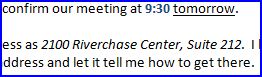 HTML example: HTML example: |
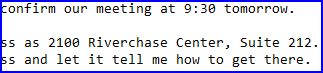 Plain text example: Plain text example: |
It starts with a basic understanding of how HTML email works. What is HTML email? HTML email, as opposed to plain text email, is email that is formatted using the same markup (language) as web pages.
Generally HTML email is more effective than plain text email because it can contain headings, text formatting, images, and tables which can all be used to attract the recipient's attention.
Notice in the examples to the right how the HTML email has visual elements which are missing in the plain text version of the same message.
While HTML email has come a long way in the past few years, it still has some faults that we must learn to deal with in order to use it to our fullest advantage. This is largely due to the fact that there are so many different software programs in use today for reading email such as Outlook, Thunderbird, Eudora, various web-based email providers. Because of the lack of a standards system, these various programs can have vast differences in the way they display email content.
Below is a list of tips and tricks you can use to format your HTML email messages so that they appear the same in the widest variety of browsers and email programs possible:
Note - these tips are primarily targeted toward those who want to code their own emails or use our editor to put them together. If you prefer to use a template, check these out. Most email marketing services like Mail Chimp and My Emma, provide you with HTML email templates to use for your emails.
- Use tables as much as possible to control the design layout and some presentation. Pure CSS and sloppy page formatting (copying and pasting without erasing prior formatting, etc.) won't hold up in the email environment. For the record, this is about the only time you'll see us advocating the use of tables for layout purposes. Note that the template styles and any external style sheet(s) associated with your website will not come through the email. If you use any CSS to design the email, it is best to use inline styles for this purpose.
- Start by creating a single-celled table (1 row by 1 column). You can insert another table with the appropriate number of cells next. Set a width on the outermost table (using a specific pixel value as opposed to a percentage will help you in visualizing your layout better, however it may cause mixed results across email programs and devices). 600px is a good starting point. If you go too much larger than 600px, people viewing the email on a mobile device or a device with a smaller screen may have difficulty. If you prefer to use a percentage for a more fluid and dynamic layout, 95% is the best choice (Yahoo! mail requires a 1% cushion on either side in order to display properly).
- Make sure you've removed all formatting from content before copying and pasting from an external source. The best way to do this is to paste the content into a plain text editor such as Notepad or Text Edit first, then copy and paste it from there to your email. This ensures that no residual formatting from the original program is brought over.
- Avoid using JavaScript as most desktop email software will disable it anyway, rendering it useless.
- Do not use Flash movies in your email.
- Be sure that all images in the email are stored in My Files and not copied and pasted from your computer.
- Do not use the background image attribute within your tables (Microsoft Outlook 2007 won't display them).
- Use the Target tab in the Hyperlink Dialog box to set the target for all hyperlinks within the email to "New Window (_blank)" so that recipients viewing the message with webmail services can open the message outside of the webmail interface.
- Avoid using too many images and not enough text, this can cause your email to be classified as spam.
- If in doubt about the probability of your message being considered spam, check it using SpamCheck.
- Always include the following information in the footer area of your email (bottommost cell of the table in this case):
- An unsubscribe link or information on how to unsubscribe to the mailing list.
- Your organization's physical mailing address (No PO Boxes).
- A "permission reminder" explaining who you are and why the recipient is being sent this message or how they got on your list.
- A link to your organization's privacy policy. You can generate one here if you don't already have one on your website (you should if you collect any information from your viewers at all).
| Email: | General |