Can I create popup window links on my site?
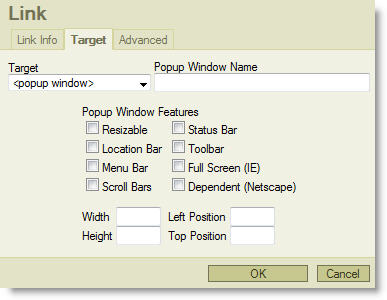 Yes.
Yes.When creating a hyperlink, you can click the target tab and select popup window as the target type.
The target tab of the link properties dialog box contains several options for what should happen when a hyperlink on your site is clicked.
The popup window target type is useful when it is unnecessary for the link to open in a full browser window such as when you are displaying a small amount of information (see example).
To create a popup like the example above, you must first create an html document. This can be done using any text editor such as Notepad. The html document must contain source code such as the following (feel free to copy and paste the example into your document):
|
<!DOCTYPE html PUBLIC "-//W3C//DTD XHTML 1.0 Transitional//EN" "http://www.w3.org/TR/xhtml1/DTD/xhtml1-transitional.dtd">
<html xmlns="http://www.w3.org/1999/xhtml"> <head>
</head> <body> <img src="http://filelocation.com/images.jpg" alt="" hspace="8" align="left" />
<p>This is an example of a popup window.</p>
<p>There is so little information here that opening a whole new browser window might be distracting.</p>
<p>Instead, we've created an html document and linked to it.</p>
</body> </html> |
- Once you have created your html document, you must save it as such (if you use a text editor, be sure to save the document with the .html extension by typing ".html" in the file name field.
- If your popup window will contain text only, remove the "img" information (in gray in the example above).
- If your popup window will contain an image, be sure to change out the URL with the one where your image is located (can be in the My Files area of your site, must be on a web server).
- The <p> & </p> tags indicate the points where new paragraphs begin end. Remove them if you only want one paragraph.
- Now, you can upload your html document to your My Files area and create your popup hyperlink.
- See "What are the definitions of the options for a popup window link?" for more information.
| Content: | Hyperlinks |
| Technical: | HTML / JavaScript / CSS |