Can I stream audio or video on my site?
 Yes.
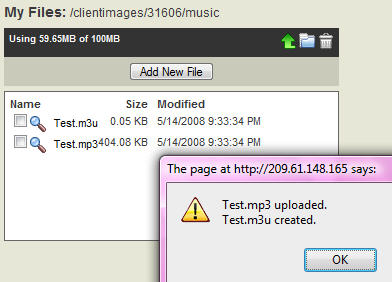
Yes.You can stream audio by uploading an MP3 file to My Files and then by creating or opening a page in your site, then linking a section of text to the M3U file which was automatically created by the application at the time you uploaded the MP3 file. You can purchase additional storage space on the Service Upgrade tab of the Account Manager.
You can also use the Media manager (depending on your hosting package) to upload audio and video files using the free E-zekiel.tv service (does not use your My Files space). To do this, audio files must be shorter than 60 minutes in length and video shorter than 15 minutes. See Media manager more information.
Alternatively, you can use a third-party provider to host and distribute your files if you need a large amount of space.
There are currently two primary ways of streaming video on your site:
- By inserting or linking to video file directly from your page (which simulates streaming)
- By using a third-party streaming service such as the ones listed below (true streaming from the server)
If you need to stream live events (live streaming), you'll have to use a third-party service provider who can provide the proper hardware, software, and large amounts of bandwidth and storage space. UStream is a free (ad-supported) option to consider.
Here are a few third-party media hosting companies to check out:
- Sermon Player (live and on-demand)
- 316 Networks (live and on-demand)
- Lightcast Media (on-demand)
- Streamhoster (live and on-demand)
- Playstream (live and on-demand)
- Upstream Networks (live and on-demand)
- The Gospel (live and on-demand)
- Ustream.tv (live and on-demand)
- Livestream (live)
| Media: | Audio Video |
| My Files: | Audio/Video |